A PC case may support your motherboard and still create problems with your GPU, CPU cooler, radiator, or power supply.
That is because compatibility is not determined by one specification.
Before buying a case, check how your major components fit together, not just whether each one appears on the support list.
1. Motherboard Size
Start with motherboard support.
Common sizes include:
ATX
Micro-ATX
Mini-ITX
Some larger cases may also support E-ATX.
But motherboard size is only the first step. If you are using a back-connect motherboard, the case must also include the correct openings behind the motherboard tray.
Standard ATX support does not automatically mean back-connect compatibility.
2. GPU Clearance
GPU compatibility involves more than maximum length.
Check:
GPU length
GPU thickness
Power connector clearance
Distance from side panels
Bottom fan clearance
A GPU may fit within the listed maximum length but still interfere with fans, radiators, or power cables.
This is especially important with larger modern graphics cards.
3. CPU Cooler Height
If you are using an air cooler, compare the cooler height with the case's maximum CPU cooler clearance.
Do not leave the measurements exactly equal if you can avoid it.
Small differences in panel design, manufacturing tolerance, or component positioning can make installation tighter than expected.
Also check whether a large cooler may interfere with tall RAM modules.
4. Radiator and Fan Clearance
A case that lists support for a 360mm radiator does not guarantee every 360mm AIO will fit.
You still need to consider:
Radiator thickness + Fan thickness + Nearby Components
Depending on the mounting position, a radiator may interfere with:
RAM
Motherboard heatsinks
GPU
Cables
Other fans
Always check the actual radiator dimensions and available space.
5. PSU Size and Cable Space
Most cases list the maximum supported PSU length.
But the power supply also needs room for cables.
This becomes more important with:
Fully modular PSUs
Larger wattage models
Drive cages near the PSU
Smaller PSU chambers
A PSU that technically fits may still leave very little space for cable routing.
6. Check Whether Features Can Be Used Together
This is the step many buyers miss.
A case may individually support:
A long GPU
A 360mm radiator
Multiple bottom fans
A large PSU
But using one of these components may reduce the space available for another.
Compatibility specifications often describe maximum individual limits, not every possible combination.
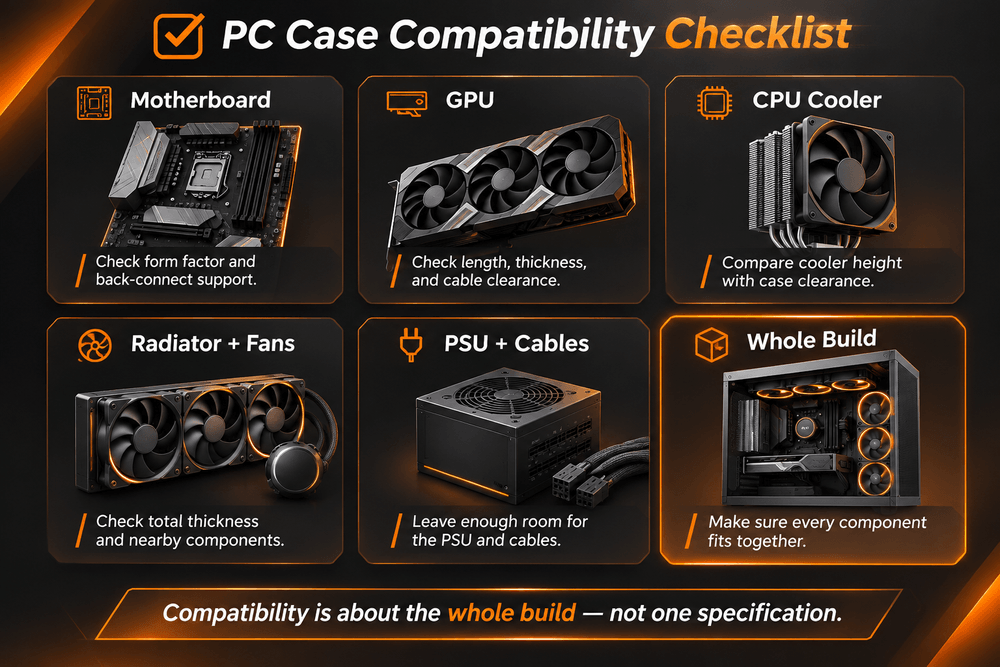
Check the Whole Build Before You Buy
Before choosing a case, compare these six areas:
Motherboard → GPU → CPU Cooler → Radiator → PSU → Special Features
Do not stop at statements such as “supports ATX” or “supports 360mm radiator.”
The safest approach is to check the dimensions of your actual components and make sure they can work together inside the same layout.
A case is truly compatible only when the entire build fits, not when each component fits on paper.