Two case fans can move a similar amount of air, but that does not mean the air will reach the same place.
In a PC case, fan angle can change the path of incoming air—and that can affect which components receive cooler air first.
This is especially relevant for the GPU, which often depends heavily on the temperature of the air available around it.
Same Airflow, Different Direction
Fan specifications such as CFM tell you how much air a fan can move, but not exactly where that air will travel inside the case.
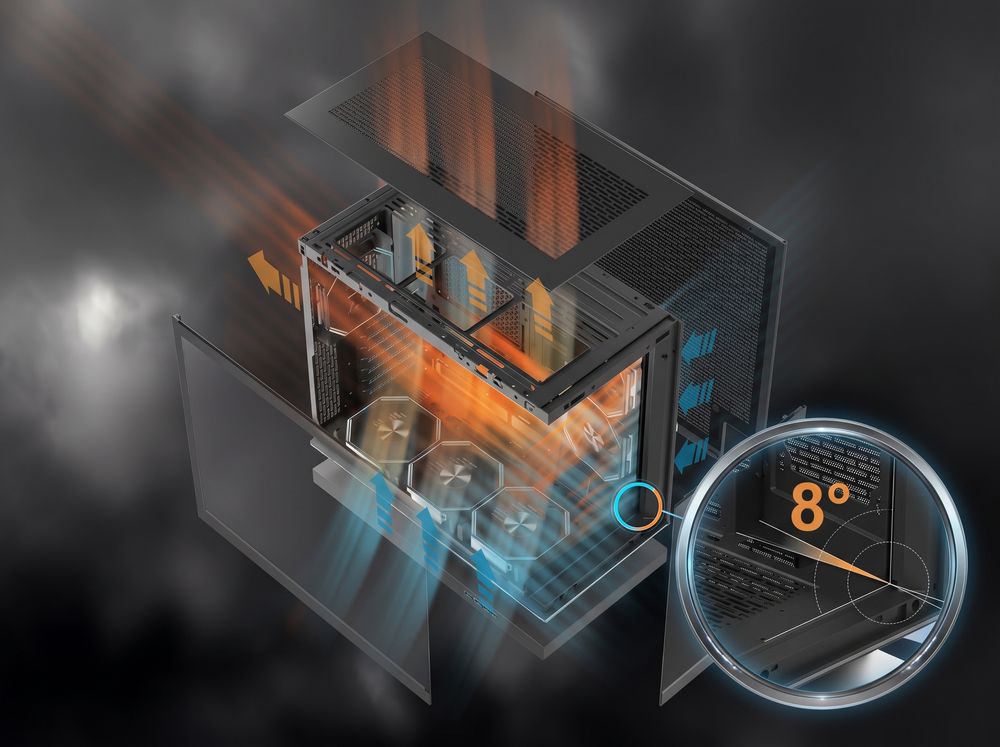
A standard side-mounted intake fan usually pushes air toward the center of the system.
If the fan mount is angled, the same intake airflow can be directed closer to a specific component instead.
That is the idea behind Directed Airflow.
Why Aim Airflow Toward the GPU?
The GPU already has its own cooling fans, but those fans still need to draw air from inside the case.
If cooler intake air reaches the GPU area more directly, the graphics card may have better access to fresh air before it mixes with warmer air elsewhere in the system.
This does not mean that a larger angle automatically gives better cooling.
The result still depends on the GPU design, fan speed, bottom intake, case layout, and exhaust path.
The main benefit of angled airflow is not necessarily “more air.”
It is better placement of the air.
How the Floatron F1 Uses an 8° Fan Angle
The darkFlash Floatron F1 ATX uses an angled side fan mount that is tilted an additional 8° toward the GPU. According to darkFlash, this design brings side intake airflow closer to the graphics card instead of sending it straight toward the middle of the case.
This makes the F1 a useful example of how a case can use fan position and angle—not just fan quantity—to shape airflow around the GPU.
Is More Direct Airflow Always Better?
Not necessarily.
If airflow becomes too concentrated or conflicts with other fans, it can create turbulence or disrupt the path toward the exhaust.
That is why fan angle should be considered as part of the complete cooling layout rather than as a single performance feature.
GPU design, radiator position, bottom intake, fan speed, and exhaust placement all still matter.
The goal is not to point every fan as directly as possible at one component.
The goal is to deliver cooler air where it is useful, while still giving heated air a clear path out of the case.
Why Fan Angle Can Matter
Fan angle does not replace good airflow design.
But it can change where the airflow goes.
For modern gaming PCs, especially systems with high-power graphics cards, that can be an important part of case design.
Good airflow is not only about moving more air.
It is about sending cool air to the right place without disrupting the rest of the cooling path.