Should you turn off memory integrity for gaming? For most gamers, the answer is no: leave Memory Integrity on. It usually costs only a few percent in frame rate, and it blocks a serious class of driver-based attacks.
The exceptions are competitive players who are CPU-bound, owners of older processors, and anyone using undervolting tools or hardware with incompatible drivers. If you fall into one of those groups, test your own games before deciding.
This matters now because Microsoft announced on September 1, 2026, that Windows quality updates will begin turning Memory Integrity on for eligible Windows 11 devices starting in October. The first update with the change is expected on Patch Tuesday, October 13, and the rollout will be gradual, so not every PC will get it at the same time.
What Memory Integrity Actually Does
Memory Integrity, also called Hypervisor-protected Code Integrity (HVCI) and found under Core Isolation, uses virtualization to build an isolated space where Windows checks kernel code. It makes sure only verified kernel-mode code loads, which blocks unsigned rootkits and raises the barrier to driver-based kernel attacks.
The feature is not new. It already runs by default on clean Windows 11 installations and on Secured-core PCs. The October change targets the many PCs where it never got switched on, such as machines upgraded from Windows 10. If Virtualization-based Security (VBS) isn't already running, the same updates will enable that too.

(Image: betanews)
Will Your PC Get It Automatically?
Windows checks whether a PC is ready before it changes anything. PCWorld lists the requirements as an 8th-generation Intel Core or newer CPU or AMD Zen 2 or newer, at least 8GB of RAM, a 64GB SSD, virtualization enabled in firmware, and drivers confirmed compatible with Memory Integrity. One caveat is that 11th-generation Core desktop processors are not part of Microsoft's current default-enablement logic, although Microsoft still recommends the feature on that platform.
If you have already turned it off, Microsoft says it will respect that. Settings made through the registry, Group Policy, or Intune stay in place. Coverage varies on exactly how Windows recognizes a manual opt-out, so check your status after the update instead of assuming.

How Much FPS Does Memory Integrity Cost?
It depends on your CPU, your game, and whether the game is limited by CPU or GPU. The available tests, most of them older, point to a small average loss with larger drops in the worst frames.
Four-CPU test with an RTX 3090 at 1080p: One summary of Tom's Hardware testing puts the HVCI average loss between 3.3% and 5.7%, depending on the processor.
Why newer CPUs fare better: Tom's Hardware found that Mode Based Execution Control (MBEC) reduces HVCI's impact to nearly the level of VBS alone.
High-end GPU test: Tom's Hardware found that disabling VBS improved performance by around 10% in its RTX 4090 testing, with 1% lows rising by as much as 15%. The same piece put the average loss at about 5% and said many people with less extreme hardware will likely see low single-digit losses.
CPU-limited test: XDA Developers cited a Ryzen 7 5800X and Radeon RX 7900 XTX test at 1280×720 where HVCI reportedly cut average frame rate by 6% and worsened frame times by 8%.
The "up to 15%" headline traces back to the worst case. A 2021 ten-game test on a Core i7-12700KF found a 7% average deficit and a 15% deficit in 1% lows with VBS on, and it cautioned that more GPU-limited conditions could shrink the impact to around 5%. Treat 15% as a ceiling for specific CPU-bound situations, not what a typical gamer will see.
One more point. Microsoft acknowledged in 2022 that Memory Integrity and Virtual Machine Platform could affect gaming performance on some Windows 11 configurations, and it advised performance-focused gamers they could temporarily disable them, at the cost of security.
Who Should Consider Turning It Off?
Consider turning it off only if at least one of these applies:
You play CPU-bound competitive games at very high frame rates. The overhead lands on the CPU, so esports titles on mid-range processors are where the loss shows up most.
You use an older CPU. The older the processor, the more likely it lacks the hardware features that reduce the penalty.
You rely on undervolting tools. Reports say Memory Integrity can interfere with undervolting tools such as ThrottleStop and Intel XTU.
An incompatible driver breaks a device you need. Windows will tell you which driver is the problem, and that is covered below.
If you mostly play GPU-limited games at 1440p or 4K, you will likely never notice it.
The Security Trade-Off
Turning it off removes a kernel-level protection layer. XDA Developers warns against disabling it preemptively just to stop Windows from enabling it, because an attacker could exploit a vulnerable driver to gain kernel-level access to your PC. The risk is modest if you only install trusted software, but it is real, especially on a PC you also use for banking and work.
Also note that turning Memory Integrity off on a Secured-core PC takes the device out of a Secured-core state.
How to Test It Before You Decide
Don't turn it off on a hunch. Run the same game, scene, resolution, and graphics preset before and after toggling Memory Integrity, and compare both average frame rate and 1% lows. If the difference is negligible, leave it on.
A practical method:
Pick a repeatable scene or the game's built-in benchmark.
Record three runs with a tool such as CapFrameX or PresentMon, and average them.
Turn Memory Integrity off, restart, and repeat.
Compare average FPS and 1% lows. A gain of under about 3–5% is usually not worth the lost protection.
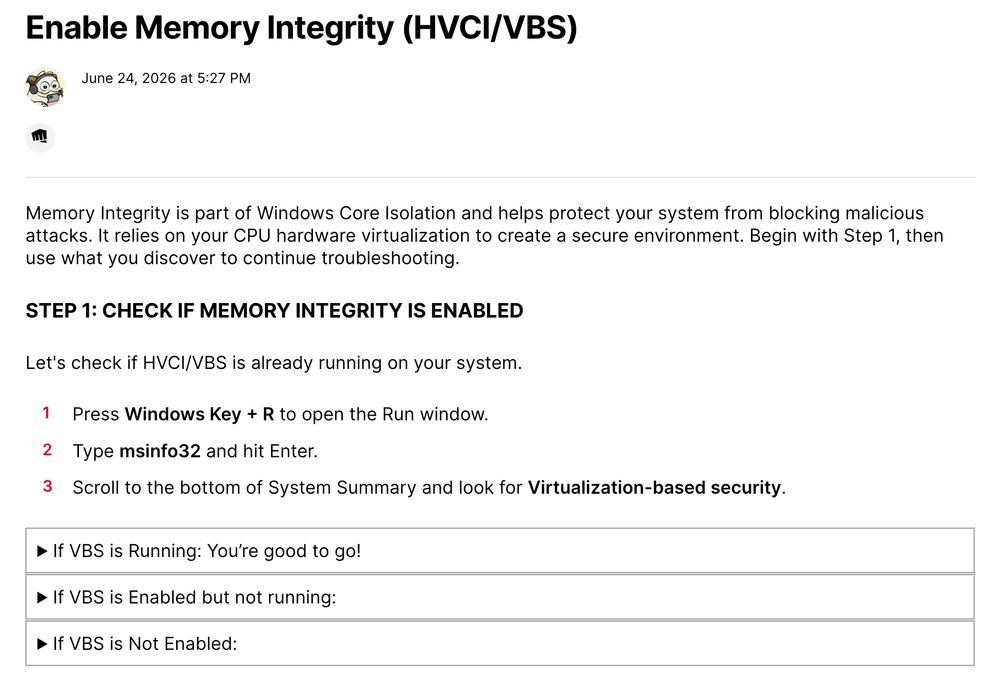
How to Check or Turn Off Memory Integrity
Open Settings > Privacy & security > Windows Security > Device security, then select Core isolation details under Core isolation. Use the toggle, then restart your PC for the change to take effect.
If the toggle is grayed out or reports a problem, an incompatible driver is the usual cause. Older anti-cheat software, RGB utilities, and hardware drivers are common culprits. Microsoft's guidance is to look for an updated driver from Windows Update or the manufacturer first, and to turn Memory Integrity off only if that doesn't work. Updating the driver is the better fix because it keeps both security and your hardware working.
FAQ
Will Windows 11 turn on Memory Integrity automatically?
Yes, on eligible PCs. Microsoft is rolling it out gradually through quality updates starting in October 2026, and it respects existing opt-outs.
Does Memory Integrity lower FPS?
Sometimes. Typical losses in the tests above range from low single digits up to roughly 6–8% in CPU-limited cases, with worse 1% lows in some games.
Is it safe to turn off Memory Integrity?
It is safe enough for many careful users, but it removes a kernel-level protection that helps block malicious or vulnerable drivers. Weigh a measured FPS gain against that risk.
Is Memory Integrity the same as VBS?
No. Memory Integrity is a feature that runs on top of VBS. Turning Memory Integrity on also turns VBS on.
Conclusion
Memory Integrity is a good default for most gaming PCs, and the FPS cost is usually small. Measure your own games, update any driver that blocks it, and turn it off only when you see a clear, repeatable loss in a CPU-bound title or when it conflicts with tools you need. This article will be updated after October 13 as real-world reports come in.