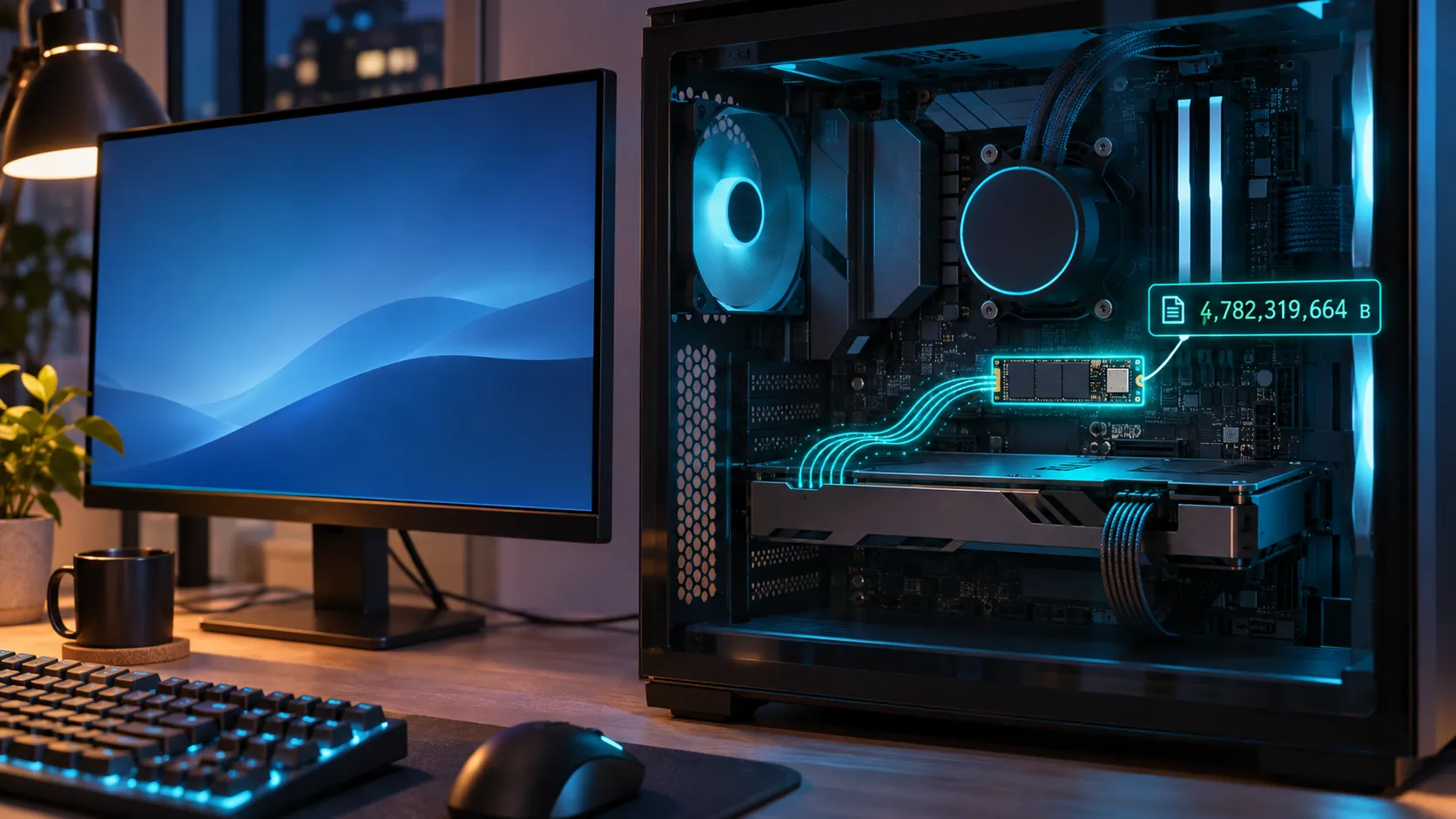
Are NVIDIA's latest GeForce 621.14 and 621.24 drivers constantly writing to your SSD? Several users have measured this behavior, but it doesn’t happen on every PC, and NVIDIA hasn’t responded yet. Here’s what hardware media have reported so far, plus how to check your own system and what to do about it.
What Happened With GeForce 621.14 and 621.24?
According to VideoCardz, users traced the problem to GeForce driver 621.14, released on November 4. After updating, the background process NVDisplay.Container.exe repeatedly rewrites a binary log file called nvlog.nvlgstg, even while the PC is idle.
The process belongs to the “NVIDIA Display Container LS” service, which the NVIDIA Control Panel and NVIDIA App depend on. Reports followed for 621.24, released on November 12, which didn’t fix the issue.
How Much Data Is Actually Being Written?
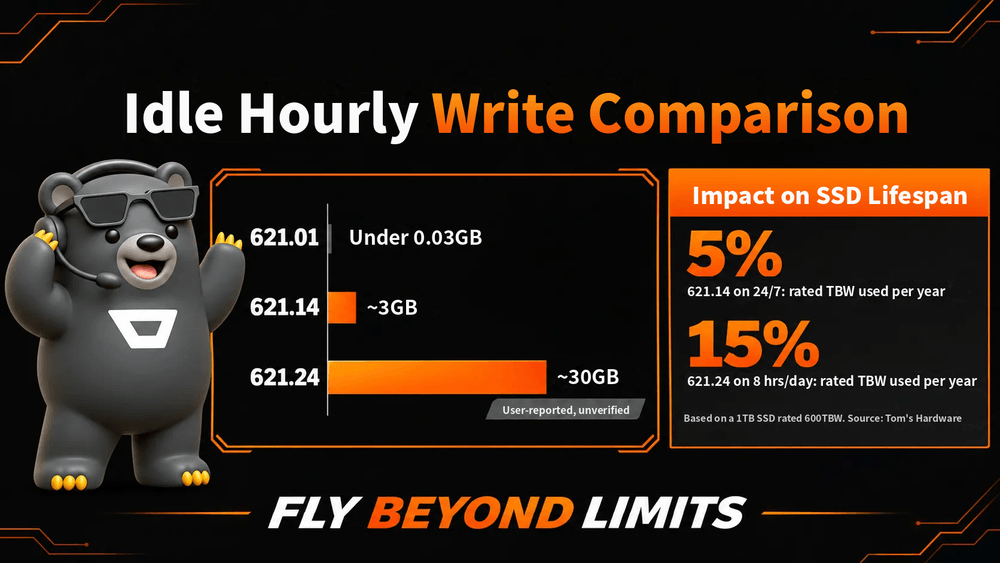
In one comparison on NVIDIA’s forums, driver 621.01 wrote under 2MB in five minutes of idle, while 621.14 wrote about 515MB in the same period. Wccftech reports another user saw more than 3GB in ten minutes, and a 621.24 user claimed about 30GB per hour.
These are user reports, not lab measurements. VideoCardz notes that process-level writes don’t necessarily equal the amount physically written to the SSD. Some users also say games, videos, and even mouse movement stutter while this happens.
Will This Kill Your SSD?
Don’t panic. Many 1TB SSDs are rated for around 600TB written (TBW). At about 3GB per hour, 24/7, that’s roughly 28TB a year, or about 5% of that rating. Even at the worst reported 30GB per hour for 8 hours a day, it’s about 88TB a year, around 15%.
Your SSD won’t fail overnight, but it’s unnecessary wear that’s worth stopping. Budget QLC drives with lower endurance ratings have less margin.
3 Steps to Check Your PC Right Now
1. Watch Live Writes in Resource Monitor
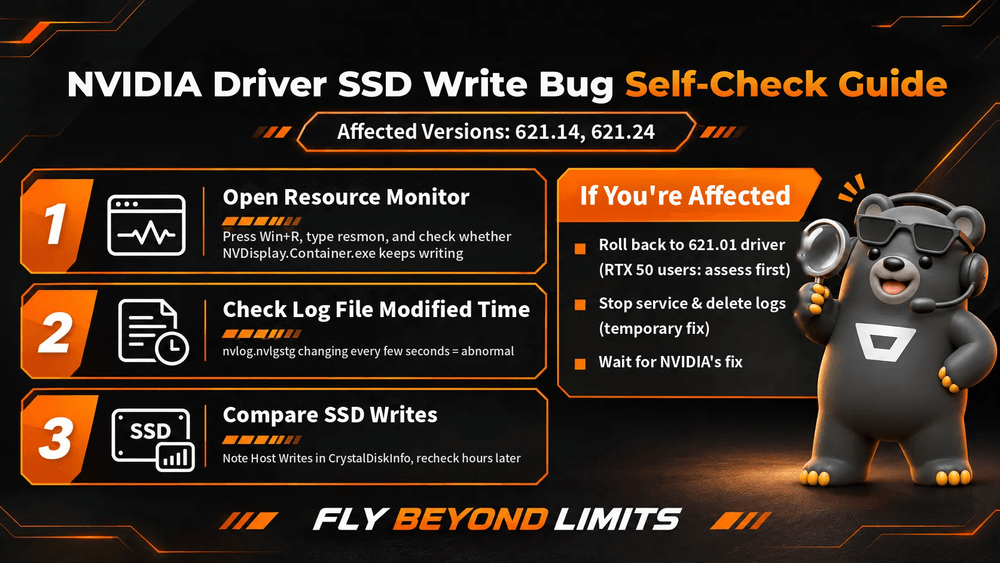
Press Win + R, type resmon, and open the Disk tab. Leave the PC idle and see whether NVDisplay.Container.exe keeps writing to nvlog.nvlgstg.
2. Check the Log File’s Timestamp
Open C:\ProgramData\NVIDIA Corporation\nvtopps\nct and see whether nvlog.nvlgstg’s modified time changes every few seconds.
3. Compare Total Host Writes
To see what actually reaches your SSD, note the “Total Host Writes” value in CrystalDiskInfo, then compare it again a few hours later.
What Should You Do If Your PC Is Affected?
The most common fix is rolling back to driver 621.01, which several users say solves it. However, 621.01 can cause video freezes and brief black screens on some RTX 50 cards, which NVIDIA fixed in hotfix 621.12, an optional beta driver. RTX 50 owners should weigh that before rolling back.
Another option is to stop the NVIDIA Display Container LS service, delete nvlog.nvlgstg, and restart the service. This reduces writes temporarily, but the file grows back. Don’t disable the service entirely, because the NVIDIA Control Panel and NVIDIA App will stop working.
As of November 20, NVIDIA hasn’t publicly acknowledged the problem, and 621.24’s release notes don’t list it as a known issue. NVIDIA fixed a similar logging problem in driver 471.96 back in 2021, so a fix is likely to follow.
Frequently Asked Questions (FAQ)
I'm still on 621.01 or an older driver. Should I worry?
Reports so far focus on 621.14 and 621.24. On 621.01, the same idle test wrote under 2MB in five minutes, so there’s no rush to update.
Did AMD graphics cards have a similar SSD write issue?
Yes. AMD confirmed that Adrenalin 26.10.1 and 26.10.2 caused excessive system drive writes and fixed it in the optional 26.11.1 driver.
Should I update my NVIDIA GPU driver later?
Wait for NVIDIA’s fix, then check Resource Monitor again after installing it to confirm writes are back to normal.
Conclusion & Smart Build Tips
This problem lives in the driver, so the real fix has to come from NVIDIA. What you can do is make a habit of checking your SSD’s health and total writes, so you catch problems like this early.
Sustained heavy reads and writes also raise SSD controller temperatures. If your motherboard doesn’t include an M.2 heatsink, adding one helps keep your system drive stable. A heatsink lowers temperature, not write volume, though, so this issue still has to be fixed at the driver level.